Checkout Workflow
Content aligns with Checkout Workflow EN — Global Pay (SwaggerHub Portal).
Introduction
This guide is issued by JSC «Global Solutions» and describes how to interact with the GLOBAL PAY CHECKOUT payment service to carry out electronic money transactions between a service provider and the payment gateway using a unified payment form under Backend integration.
Terms and definitions
- Operator — JSC «Global Solutions».
- Provider — a legal entity that offers its services via online payments (shops, cinemas, telecoms, utilities / tax services, etc.).
- Payment service «GLOBAL PAY CHECKOUT» — an automated payment service owned by JSC «Global Solutions» that automates acceptance of payments on behalf of providers.
- User — the person on whose behalf the payment is made.
- Payment system — card processing centers supported by GlobalPay.
{{base_checkout_url}}— the base part of the Checkout system URL for HTTP requests (e.g. to create a payment token):- Test —
https://checkout-api-dev.globalpay.uz/checkout - Staging —
https://checkout-api-staging.globalpay.uz/checkout - Production —
https://checkout-api.globalpay.uz/checkout
- Test —
Steps and prerequisites before integration
- JSC «Global Solutions» receives a request from the provider.
- After the connection request to the GLOBAL PAY CHECKOUT gateway is approved, a contract is signed.
- Technical staff of JSC «Global Solutions» register the provider in GLOBAL PAY GATE and issue
service_idandclient_id, as well as authentication credentials for further interaction with the payment service. - After all required credentials are provided, the provider proceeds with development and testing in the test environment.
High-level interaction diagram
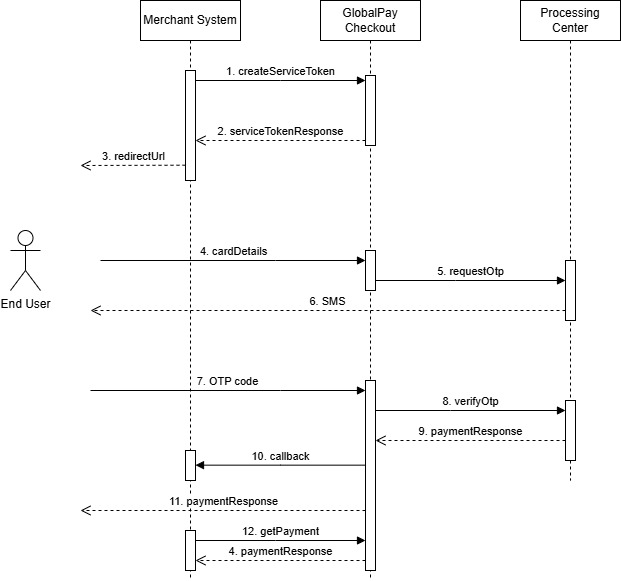
Sequence of actions
Merchant authentication with the Operator’s system may occur at any stage of the flow.
| Symbol | Description |
|---|---|
createServiceToken | Request from the merchant system to create a payment token |
serviceTokenResponse | Operator’s response to the create-token request |
redirectUrl | Browser redirect of the user to the payment page |
cardDetails | User enters card data |
requestOtp | Operator requests an OTP from the processing center |
SMS | SMS with OTP is sent to the card’s SMS-notification number |
OTP code | User enters the received OTP |
verifyOtp | Operator sends the OTP to the processing center for verification |
response | Response to OTP verification and payment execution |
callback | Request from the Operator to the merchant system with the transaction result at the agreed URL |
paymentResponse | User is notified of the result and redirected to the merchant page (if specified when creating the token) |
getPayment | Request for transaction information by payment token |
paymentResponse (GET) | Operator’s response with transaction data when it exists in the system |
Detailed flow: authentication and payment
Obtain authorization token
Request: POST {{base_checkout_url}}/v1/merchant/auth
Request body:
{
  "username": "{{oauth_username}}",
  "password": "{{oauth_password}}"
}
oauth_username and oauth_password are the credentials issued to the merchant.
Example response:
{
  "expires_in": 600,
  "refresh_expires_in": 108000,
  "access_token": "eyJasdasd...",
  "refresh_token": "eyJh...",
  "token_type": "Bearer",
  "scope": "gp-client",
  "session_state": "425bda47-cca6-4f29-9ef0-3ddb3bd73910"
}
access_token— use in subsequent requests in the headerAuthorization: Bearer <access_token>. Lifetime:expires_in(seconds).refresh_token— to refresh the token:POST {{base_checkout_url}}/v1/merchant/auth/refresh. Refresh window:refresh_expires_in(seconds).
Obtain payment token
Request: POST {{base_checkout_url}}/v1/user-service-tokens
(The documentation also refers to this as a POST to user-service-tokens; if the path differs in your environment, confirm the URL with the Operator.)
Request body:
{
  "name": "Global Pay Checkout Payment 152",
  "description": "Test payment via Checkout",
  "externalId": "1239a830-d5b8-4448-b216-45223a000152",
  "account": "123456678",
  "externalServiceId": 5,
  "tokenLifespan": 1000,
  "items": [
    {
      "title": "test_title1",
      "price": 300000,
      "count": 1,
      "code": "001",
      "units": 1,
      "vatPercent": 0.11,
      "packageCode": "0023"
    }
  ],
  "requestFields": [
    {
      "value": "300000",
      "name": "amount"
    },
    {
      "value": "UZS",
      "name": "currency"
    }
  ],
  "successRedirectUrl": "https://translate.google.com/?sl=en&tl=ru&text=successful%20transaction&op=translate",
  "failRedirectUrl": "https://translate.google.com/?sl=en&tl=ru&text=failed%20transaction&op=translate"
}
Fields:
| Field | Description |
|---|---|
name | Token title. Must be globally unique so users are not confused. |
description | Payment description |
externalId | Transaction ID in the merchant system |
account | Payee identifier in the provider (merchant) system |
tokenLifespan | Optional. Token lifetime (seconds). Default 900, minimum 300, maximum 86400. Values below 300 are clamped to 300; above 86400 to 86400. |
externalServiceId | Merchant’s issued serviceId — cash-desk identifier for the payment |
items | Line items for tax authority reporting. May be empty for a single payment/item; otherwise the merchant must populate per applicable law. |
requestFields | Extra fields. Required entries named amount and currency: amount in minor units (tiyin for UZS) and currency code. |
successRedirectUrl | Browser redirect on successful payment |
failRedirectUrl | Browser redirect on failed payment |
The items array includes code (IKPU), packageCode, units, and vatPercent. See Fiscalization for details.
Example response:
{
  "id": "d4b482e7-276d-4d7f-81eb-9271f70057a5",
  "serviceName": "GlobalPay Test Service",
  "description": "Test payment via Checkout",
  "name": "Global Pay Checkout Payment 173",
  "externalServiceId": 6,
  "account": "123456678",
  "tokenLifespan": 900,
  "items": [],
  "requestFields": [
    {
      "name": "amount",
      "value": "300000",
      "required": true
    },
    {
      "name": "currency",
      "value": "UZS",
      "required": true
    }
  ],
  "externalId": "1239a830-d5b8-4448-b216-45223a000173",
  "successRedirectUrl": "https://translate.google.com/?sl=en&tl=ru&text=successful%20transaction&op=translate",
  "failRedirectUrl": "https://translate.google.com/?sl=en&tl=ru&text=failed%20transaction&op=translate",
  "vmEnabled": true,
  "mirEnabled": false,
  "status": "INIT",
  "error": null,
  "userRedirectUrl": "https://checkout-dev.globalpay.uz/?token=d4b482e7-276d-4d7f-81eb-9271f70057a5"
}
The id field is the payment token for next steps and user redirect.
After the response, redirect the user to the URL in userRedirectUrl.
User actions and OTP
- The user enters card data and taps Pay.
- For UZCARD or Humo cards, OTP is requested and an SMS code entry form is shown. For Visa/Mastercard, OTP may be skipped at this step.
- For Visa/Mastercard, an OTP form may appear as part of 3-D Secure (bank-controlled form).
- After data entry the user sees the result; if
successRedirectUrl/failRedirectUrlwere set, the browser is redirected accordingly.
If the payment for this token has already been completed or more than 15 minutes have passed since the token was created, payment with that token is not possible.
Payment status
Callback from the Operator to the merchant when payment completes — example body:
{
  "id": "bc45985c-2dfb-4f6c-958f-b4f135f6ab69",
  "externalId": "01JRG762NEGQSBM0CW3NTAB195",
  "serviceToken": "bb8c71ba-9aa7-4c14-b599-8cbe58e1b0ca",
  "cardNumber": "860031******4665",
  "amount": 10000000,
  "currency": "UZS",
  "account": "998338980784",
  "status": "APPROVED",
  "performedAt": 1744301218,
  "error": null,
  "gnkDetail": {
    "fiscalSign": null,
    "qrCodeUrl": "",
    "success": true,
    "receiptId": 435
  }
}
status:APPROVED— success;FAILED— failure. OnFAILED,erroris populated (e.g.INSUFFICIENT_FUNDS).gnkDetail— for successful operations: tax authority (GNK) fiscalization data;qrCodeUrl— link to the electronic receipt.
Current status by token at any time — GET
{{base_checkout_url}}/v1/payment/servicetoken/{{user_service_token}}
Here user_service_token is the payment token ID (field id from the create-token response for user-service-tokens).
The response shape matches the callback body.
If more time has passed since token creation than tokenLifespan (default 900 s ≈ 15 min) and the system has not received card data and a debit request, the payment will get status: FAILED, error: "PAYMENT_EXPIRED".
HTTP errors
| Code | Meaning |
|---|---|
400 | Invalid request data |
401 | Request not authorized |
404 | Entity not found or URL does not exist |
500 | Unexpected server error |
Error body format:
{
  "detail": "Oops, something went wrong. Try again later",
  "code": "27",
  "path": "/payments/v1/payment/init",
  "timestamp": "2025-04-10 19:02:48",
  "trace": "asdasd123123"
}
| Field | Description |
|---|---|
detail | Error description |
code | Error code |
path | Request path where the error occurred |
timestamp | Time when the error occurred |
trace | Request correlation id for diagnostics |